
Some test numbers in our coverage can receive RCS (Rich Communication Services) messages. This page explains how RCS appears in Live Number Testing and how to read the results.
RCS-capable numbers
A test number is marked as RCS-capable once it has successfully received an RCS message at least once. This confirms the device is technically able to receive RCS. However, it does not guarantee that the number's mobile network supports RCS at the time of your test.
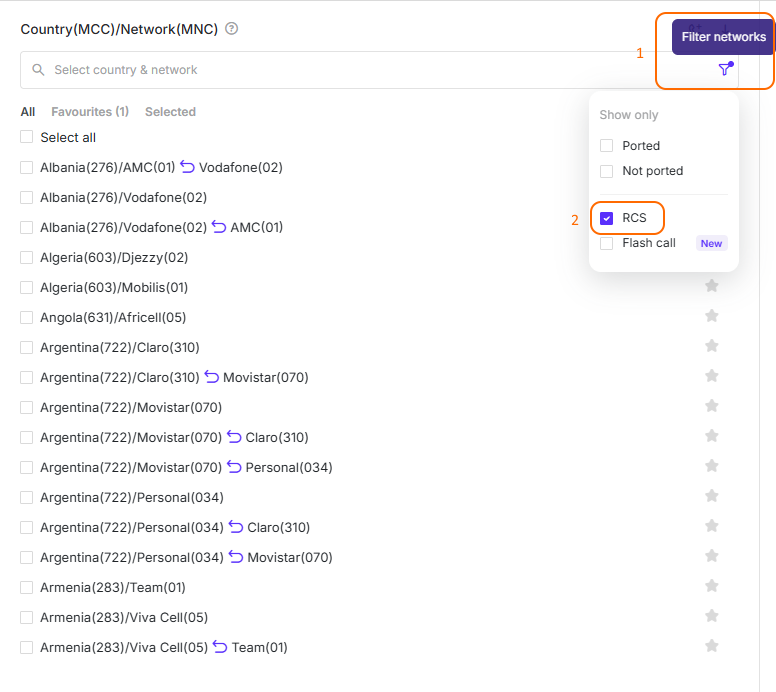
To test only RCS-capable numbers, click the funnel icon in Destinations and select RCS. Only networks with RCS-capable test numbers will be shown.
How RCS works in testing
In Live Number Testing, TelQ's platform always submits the test message as SMS via SMPP, exactly like your regular traffic. Currently it is not possible to submit a test strictly as RCS using LNT page UI.
If you want the message to be received as RCS, you can adjust your own setup so that your platform or supplier converts the SMS to RCS along the way. Whether it then arrives as RCS also depends on the device and the network at the moment of delivery.
If you want to test RCS without any extra setup, we recommend using Manual Testing or the REST API. There you send the message from your own platform, so you can send it as RCS directly.
RCS messages are delivered over mobile data or Wi-Fi, not over the SMS channel. Sending media (images, videos, etc.) with a test message is currently not supported.
Reading the results
If a test is received as RCS, it gets one of the following Receipt statuses:
-
RCS Positive: The RCS message was delivered to our test number with Sender and Text as submitted.
-
RCS Text or Sender ID Replaced: The RCS message was delivered to our test number with the Sender ID or Text modified.
To see only RCS results, use the Delivered as (channel) filter above the results table and select RCS.

All other columns (DLR, Sender ID, Text, delays) work the same way as for SMS. See Live Number Testing.